














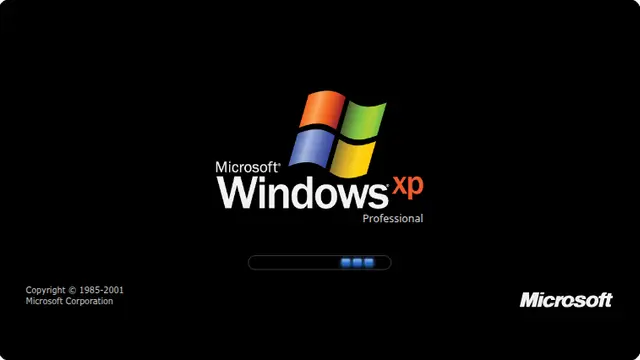































What the windows xp boot screen is
The loader is not a progress bar. It never fills and it never indicates anything — it just cycles, which is why an XP machine could sit on this screen for twenty minutes without telling you a single useful thing.
For a lot of people this is the most nostalgic image in computing: the black screen, the wordmark, and those three blocks going round again. It is a period piece rather than a serious prank.
- Nostalgia on an office display or at a retro event
- A period-correct screen for a film or a photograph
- The opening act before the XP update screen
Windows XP startup screen, online
The edition selector switches between Professional, Home and Media Center, and the choice is kept in the URL.
Pair it with the fake Windows XP update screen for a longer routine: boot, update, boot again.
How to run it, and how to stop it
Press F for fullscreen, then F11 to hide the browser’s own toolbars. That second step is the one that matters: an address bar sitting above the screen gives the whole thing away instantly.
To end it: Escape leaves fullscreen, F11 brings the toolbars back, and closing the tab removes it entirely. Nothing is installed, no file is written and no setting is changed, so there is nothing to undo afterwards.
Worth saying plainly — use this on people who will find it funny, and on machines you are allowed to touch. Show them the way out once the joke has landed.