











































Skip to content
Browser Screensaver

High Contrast Test

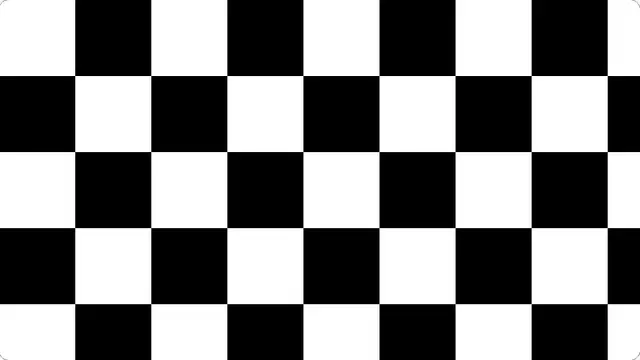
Large black and white blocks side by side. This is where local dimming, blooming and black-level handling all become visible at once.

Hard black and white blocks across the whole panel. On a display with local dimming, watch the backlight react as you start it.

Press F for fullscreen, Esc to exit.

What the high contrast test shows

A display with full-array local dimming has to decide, block by block, how bright to run the backlight behind each region. This pattern gives it the hardest possible problem — bright and dark adjacent everywhere — and the result tells you a great deal about how it behaves.

Blooming is the halo of light spilling from a white block into the black around it. Some is inevitable; a lot means few dimming zones. On an OLED there should be essentially none, because each pixel makes its own light.

What to look for

Watch the moment the pattern appears: on a display with local dimming you can often see the backlight settle over a second or so. Then look at the boundaries between blocks for halos, and at the black squares for how black they really are.

Change the block size. Small blocks are much harder for a dimming system than large ones, and the point at which blooming becomes obvious tells you roughly how coarse the zones are.

Questions

What is blooming?

Light from a bright area spilling into the dark around it, because the backlight zone behind it is larger than the bright object. It is a limitation of local dimming; OLED panels do not have it because each pixel emits its own light.

Should the black squares be completely black?

On an OLED, yes. On an LCD, no — some backlight always leaks through, and how close to black it gets is essentially what "contrast ratio" measures.

Is this the same as a contrast ratio test?

No. This is a viewing pattern for how a panel handles hard contrast. The contrast ratio test page calculates the WCAG ratio between two colours you choose, which is a different question entirely.

Is the high contrast test free?

Yes — free, with no account, no download and no limit. It is a web page, so it runs on any device with a modern browser.

Do I need to be fullscreen?

For anything involving the whole panel, yes. Press F, or the fullscreen button. On a desktop browser F11 also hides the browser toolbars, which matters for the tests where a bright strip at the top of the screen would affect what you are looking at.