










































Skip to content
Browser Screensaver

Colour Distance Test

How far apart two colours really are. Measured in CIE Lab as Delta E, which corresponds to what your eye sees — unlike RGB distance, which does not.

Press F for fullscreen, Esc to exit.

What the colour distance test shows

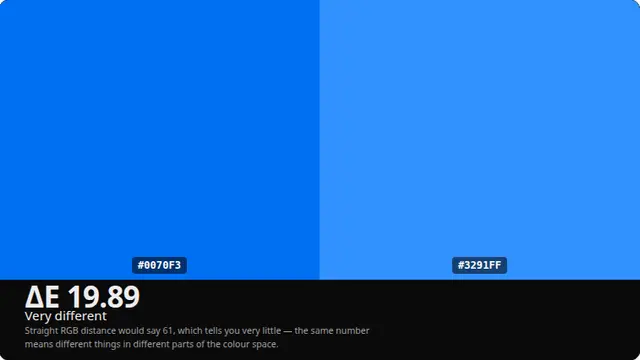
RGB distance is nearly useless perceptually. Two greens a long way apart numerically can look identical, while two blues that are numerically close look obviously different, because RGB space is not uniform with respect to human vision.

CIE Lab was built to fix that: equal distances in Lab correspond roughly to equal perceived differences. A Delta E of about 2.3 is the just-noticeable difference, which is the threshold that makes the number mean something concrete.

What a Delta E number means

Below 1, the two colours are indistinguishable. Below 2.3 they are at the threshold — you might catch it side by side and never apart. Between 2.3 and 5 they are noticeably different when adjacent. Above 10 they are simply different colours.

This matters when you are checking whether two greys in a design system are actually doing different jobs, or whether a brand colour has drifted between two files.

Questions

What is Delta E?

The distance between two colours in CIE Lab space, which was designed so that equal distances look like equal differences to a human eye. Roughly 2.3 is the just-noticeable difference.

Why not just compare RGB values?

Because RGB distance does not match perception. Numerically distant greens can look identical while numerically close blues look obviously different. That is exactly the problem Lab was designed to solve.

Which Delta E formula is this?

CIE76, which is the one the 2.3 threshold is quoted against. Later formulae are more precise for very close colours, but that precision is not meaningful on a display whose calibration is unknown.

Is the colour distance test free?

Yes — free, with no account, no download and no limit. It is a web page, so it runs on any device with a modern browser.

Do I need to be fullscreen?

For anything involving the whole panel, yes. Press F, or the fullscreen button. On a desktop browser F11 also hides the browser toolbars, which matters for the tests where a bright strip at the top of the screen would affect what you are looking at.